> For the complete documentation index, see [llms.txt](https://pacificminer3e2wfrgtb.gitbook.io/mineraze/llms.txt). Markdown versions of documentation pages are available by appending `.md` to page URLs; this page is available as [Markdown](https://pacificminer3e2wfrgtb.gitbook.io/mineraze/global/resource-pack.md).
# Resource Pack
## How to join MINERAZE?
1. **Prepare Your Game:**
* Open Minecraft and navigate to the Multiplayer section.
* Ensure you are running Client version **26.1 or later version.** \
We always support latest Minecraft version.
2. **Add the Server:**
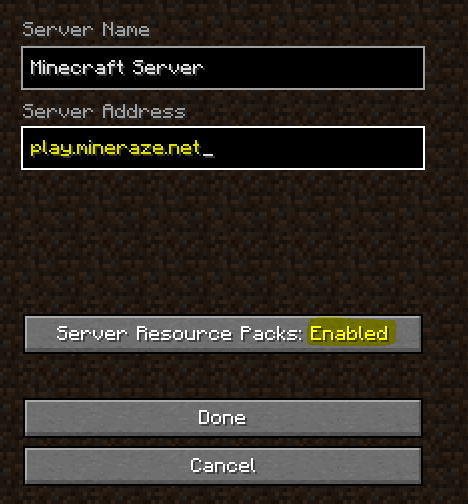
* Click "Add Server" at the bottom of the list.
* Enter the Server IP: **PLAY.MINERAZE.NET**
* **Enable** **Server Resource Packs** for an improved experience. This pack adds textures to custom items, monsters, pets, and more without altering vanilla textures.
3. **Connect to the Server:**
* Once setup is complete, hit "DONE" and join the server.
## Is the Resource Pack not loading properly?
1\) Delete everything in your server-resource-packs folder. On Windows, you can access this by doing:
* Open the Windows prompt and type %appdata%
* Navigate to ".minecraft" -> "server-resource-packs".
* Delete all contents inside "server-resource-packs."
2\) Should the first method prove unsuccessful, try connecting via a different IP address. The server's IP system is wildcarded, allowing variations like anything.mineraze.net to function. For example, using **fixed.mineraze.net** could be an effective alternative.
3\) In cases where the custom models (like hats, pets, and blocks) appear correctly, but the chat displays in Chinese characters or similar, the solution involves adjusting your language unicode settings. To rectify this, follow these steps:
* Navigate to "Options" in the game menu.
* Select "Language".
* Change the "Force Unicode" setting to OFF. This should correct the chat display issue.